
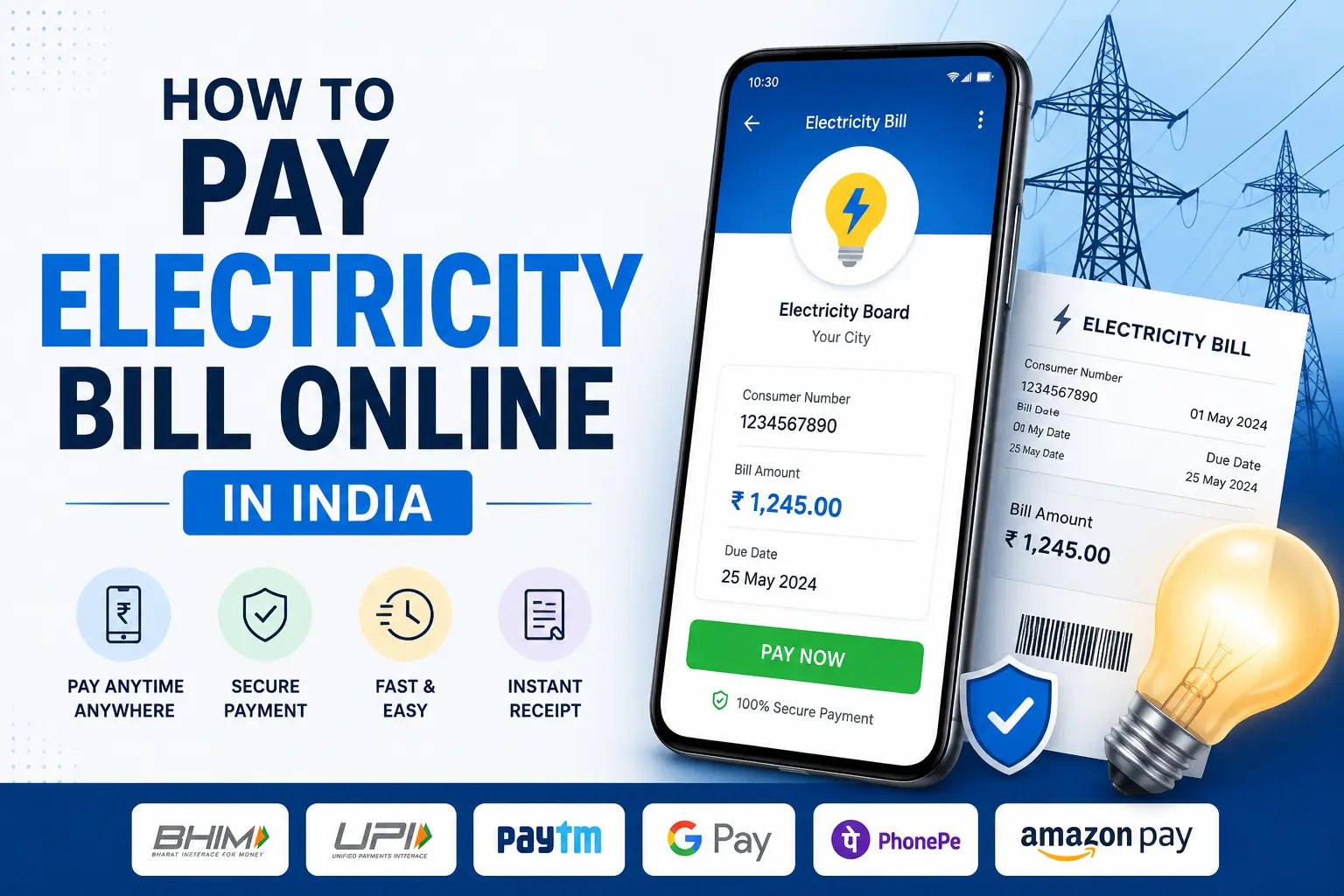
Millions of electricity consumers in India still pay their bills in person at DISCOM counters, even though every major electricity board now supports online payment. If you’re moving from offline to online payments, or you’re just not sure which app or method to trust, this guide walks through exactly how to pay your electricity bill online in India step by step, in plain language.
Can You Really Pay Your Electricity Bill Online in India?
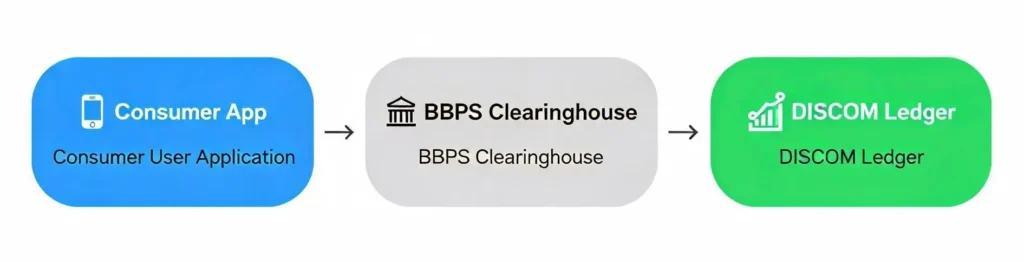
Yes, absolutely. You can pay electricity bills online in India from anywhere whether you’re in Mumbai, Ahmedabad, Chennai, Lucknow, or even abroad. The entire system is now connected through a centralized digital network called Bharat Connect (previously known as the Bharat Bill Payment System or BBPS), which is managed by the National Payments Corporation of India (NPCI).
This network connects over 22,000 electricity billers across 700+ digital payment channels meaning whether you use Google Pay, PhonePe, Paytm, or your bank’s app, they all talk to the same central system. Your payment reaches the electricity board instantly, and you get a proper digital receipt with a transaction reference number.
How to Pay Your Electricity Bill Online
Before I get into each individual app, it helps to understand that every single method below UPI apps, bank apps, DISCOM websites follows more or less the same underlying flow. Once this clicks, switching between apps becomes second nature.
Here’s the process in its simplest form: you open your chosen app or website, find the “Electricity” or “Utility Bills” option, select your state and your specific electricity board (this matters India has 40+ different DISCOMs, and picking the wrong one means your bill won’t show up), and enter your Consumer Number, Service Number, or CA Number. This number is unique to your connection and is printed right on your physical bill or your last e-bill. The app then fetches your live bill directly from your DISCOM’s system, showing your name, amount due, and due date. You verify the details match, choose how you want to pay, confirm, and you’re done usually within a minute.
The only real decision you’re making is which app or portal to use, and that mostly comes down to convenience, cashback, and whether you want a middleman between you and your electricity board at all. I’ve broken down the most popular routes below, starting with the payment rail that powers almost all of them.
Pay Electricity Bill Using UPI
Most people don’t realize this, but Google Pay, PhonePe, Paytm, and even most bank apps are all just different front doors to the same underlying system: UPI (Unified Payments Interface). UPI links directly to your bank account, so there’s no wallet balance to manage and no card details to type in you authorize the payment with a 6-digit UPI PIN and the money moves bank-to-biller.
The advantage of paying via UPI specifically is that it’s usually fee-free (unlike some card payments that carry a small convenience charge), it’s instant, and it works identically no matter which app’s interface you’re using. If you’d rather not use a Google, PhonePe, or Paytm account at all, the BHIM app is NPCI’s own “neutral” UPI app and handles electricity bill payments the exact same way open BHIM, go to bill payments, select your state and board, enter your Consumer Number, and pay with your UPI PIN.
Whichever app you use, the steps are functionally the same, so pick whichever one you already trust with your bank account.
Pay Electricity Bill Using Google Pay
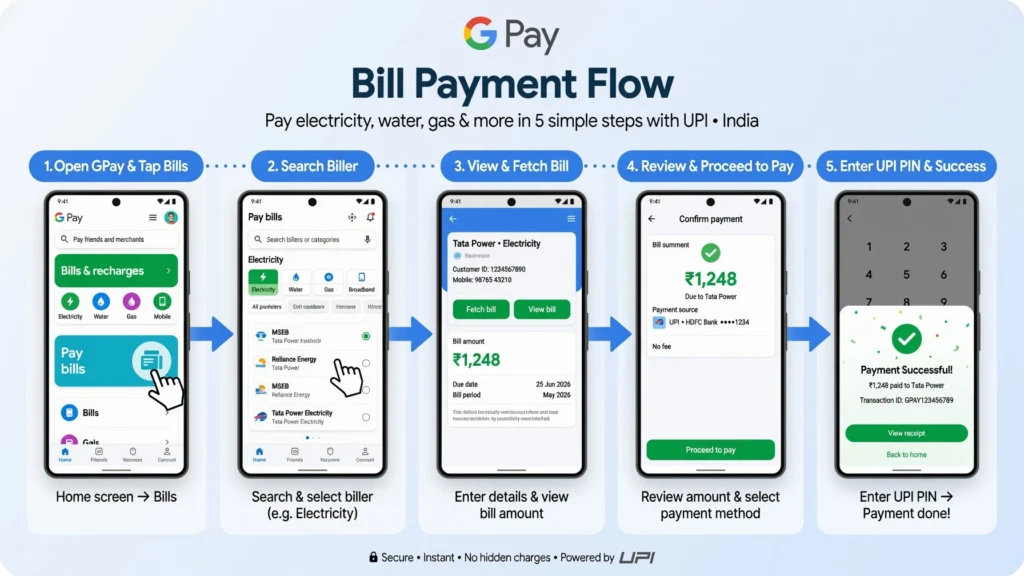
Google Pay is one of the most widely used options for this. It links directly to your bank account via UPI, so there’s no need to add money to a wallet. Here’s exactly how to do it:
Open the Google Pay app and swipe up on the home screen. You’ll see a section called “Bills, Recharges and Utilities” tap on it. Select “Electricity,” and you’ll get a list of electricity boards sorted by state.
Pick your state and your electricity board (for example, if you’re in Gujarat and your connection is with Torrent Power, select that). Then enter your Consumer Number this is printed on your physical bill.
Google Pay will automatically fetch your bill details from the DISCOM’s system. You’ll see your name, the amount due, and the due date right on the screen. Verify it matches your bill, tap “Pay Bill,” select your bank account, and enter your 6-digit UPI PIN. Done.
One more shortcut: if your physical bill has a QR code printed on it, you can scan it directly from the Google Pay home screen. It fills in your details automatically you just need to enter your PIN.
Pay Electricity Bill Using PhonePe
PhonePe works very similarly to Google Pay but gives you more flexibility in how you pay. You can use UPI, a credit card, a debit card, or even your PhonePe wallet balance.
Open PhonePe and tap on “Recharge & Pay Bills.” Tap “Electricity,” choose your provider (like UPPCL Urban if you’re in UP, or TANGEDCO if you’re in Tamil Nadu), and enter your Consumer Number or CA Number. PhonePe fetches your bill and shows you the amount. Choose your payment method and confirm.
One thing to note: PhonePe requires an active Indian mobile number for SMS verification. So if you’re currently living abroad, you may face trouble using PhonePe directly. I’ve covered the NRI payment situation separately below.
Pay Electricity Bill Using Paytm
Paytm has been in the electricity bill payment game for years. What I like about Paytm is that it automatically generates a downloadable PDF receipt after every payment really handy if you ever need to prove you paid your bill.
Go to the Paytm app or website, tap “Electricity Bill,” select your state, pick your electricity board, and enter your Consumer ID. Paytm fetches the live bill details billing date, your name, and the total amount due. You can pay via Paytm Wallet, debit/credit card, net banking, or UPI.
For those who are more comfortable using a browser than an app, Paytm’s website works just as well.
Other Ways to Pay: Bank Apps and Your Electricity Board’s Website
Beyond the UPI apps, there are two more routes worth knowing, especially if you want cashback or you’d rather cut out third-party apps entirely.
Your bank’s app HDFC PayZapp example. Almost every major Indian bank now lets you pay utility bills directly from their app. HDFC Bank’s PayZapp app, for example, has a dedicated “Bills & Recharges” section. You select “Utilities,” then “Electricity,” pick your provider, enter your Consumer ID, and pay using your HDFC card, UPI, or bank account.
The bonus with bank apps is that you often earn reward points or cashback on your card. HDFC Infinia, Axis ACE, and similar cards give anywhere from 2% to 5% back on utility payments which adds up fast if you have a large electricity bill every month. Card reward rates and terms change fairly often, so it’s worth confirming the current offer on your card issuer’s website before relying on a specific percentage.
Your electricity board’s own website Torrent Power example (Ahmedabad). If you prefer to pay directly without any third-party app, your electricity board’s own website is the safest and most direct route. Torrent Power is a useful example here since it serves Ahmedabad, Surat, and Gandhinagar.
Go to connect.torrentpower.com and click “Pay Bill without Logging In” or “Pay Now.” Select your city, enter your Service Number (printed on your bill), complete the simple captcha, and click Pay Now.
The system shows your name, billing date, units consumed, and total amount. Enter your mobile number and email to get a payment confirmation, then choose your payment method. The best part: if you pay via net banking or a standard RuPay debit card, there are zero processing charges under GERC-approved rules. Once done, you can download your receipt as a PDF immediately.
This direct approach works similarly for other boards like MSEDCL in Maharashtra, TANGEDCO in Tamil Nadu, BESCOM in Karnataka, and so on.
How to Check Electricity Bill Amount Online
You don’t actually need to be ready to pay to check what you owe every method above shows you the amount before it asks you to commit to paying, and there are a couple of ways to check it even faster.
The most reliable source is always your DISCOM’s own website, since it’s reading directly from the billing system rather than a synced copy. Most boards have a “View Bill” or “Quick Pay” option that asks for nothing but your Consumer Number and a captcha no login, no OTP. MSEDCL’s Mahavitaran portal, BESCOM’s site, and Torrent Power’s connect.torrentpower.com all work this way, and they’ll show your current amount due, the billing period, units consumed, and often your last few months of billing history too.
If you just want a quick number without opening a browser, any of the UPI apps will fetch and display your live bill the moment you enter your Consumer Number, even if you back out before paying. One thing worth knowing: bills are usually generated between the 1st and 10th of the month depending on your board’s billing cycle, so if you check right after your meter reading date and see no bill yet, that’s normal try again in a few days.
How to Download Electricity Bill Payment Receipt
Every legitimate payment method gives you a receipt, but where you find it depends on how you paid.
On Google Pay and PhonePe, open your transaction history, tap the specific electricity payment, and you’ll see a “Download” or “Share” option that generates a PDF or a shareable receipt with the transaction reference number. Paytm does this automatically and stores the PDF in your payment history without you needing to ask.
On your DISCOM’s own website, look for a “Show as PDF” or “Download Receipt” option right after payment, or under a “View Bill” / “Payment History” section if you’re checking later. Torrent Power, MSEDCL, and BESCOM all offer instant PDF downloads this way. It’s worth knowing that a downloaded electricity bill or receipt is widely accepted as address proof for KYC and bank account verification in India, so keeping a folder of these PDFs is genuinely useful beyond just tracking payments.
If you paid through a bank app, check the app’s own transaction or statement section most banks let you download a payment confirmation the same way you would for any UPI transaction.
What to Do If Electricity Bill Payment Is Successful but Bill Is Still Unpaid
This causes a lot of unnecessary panic. Money’s been deducted from your account, the app shows “Payment Successful,” but when you check your DISCOM’s website, it still says the bill is unpaid.
Here’s what’s actually going on almost every time: your payment app and your electricity board’s billing system are two separate systems that talk to each other through the BBPS network, and that handshake isn’t always instant. There’s usually a reconciliation window of anywhere from a few hours to about 24 hours before your DISCOM’s own records catch up and mark the bill as paid.
Don’t pay again that’s the single most important thing. Instead, open your bank statement or UPI app and confirm the debit actually happened, and note down the transaction reference number or UTR, since you’ll need it if this needs to be escalated. Give it 24 hours and check your DISCOM’s website again rather than the app, since the app showing “success” only confirms your side of the transaction, not that the biller has updated their books. If it’s still showing unpaid after 24–48 hours, contact your DISCOM’s customer support directly with the transaction reference number and a screenshot this is faster than going through the app’s support first, since the DISCOM is the one that needs to update the record. If neither side resolves it within a few more days, BBPS transactions fall under a formal NPCI grievance redressal process, and your payment app’s support team can escalate it on your behalf once you provide the UTR.
How to Pay Electricity Bill Online in India from Abroad (NRI Guide)
This is a common question for NRIs who’ve moved to the US, UK, or Canada but still have property back in India. Here’s the honest answer: you can’t pay Indian electricity bills directly using a foreign card or PayPal.
Here’s why. The Reserve Bank of India requires all online transactions on Indian payment gateways to use multi-factor authentication usually an OTP sent to an Indian mobile number. Most electricity board portals also don’t accept internationally issued cards at all.
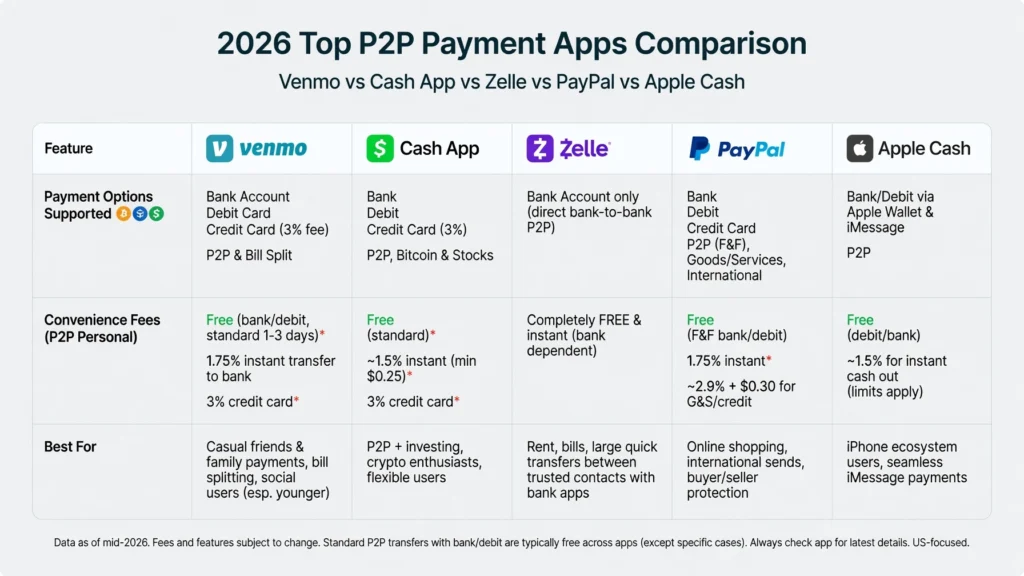
PayPal specifically stopped all domestic Indian payment operations in April 2021. You cannot use a PayPal wallet to pay an Indian electricity bill. However, PayPal’s remittance service called Xoom can help indirectly you can send money from your overseas bank account directly to an Indian bank account or UPI address. Once the money arrives in India (often within minutes), someone locally can pay the bill through any of the apps mentioned above.
Also worth knowing: TCS (Tax Collected at Source) rules under the RBI’s Liberalised Remittance Scheme apply to money sent out of India above an annual threshold they don’t really come into play when an NRI is paying a domestic Indian electricity bill from abroad. Separately, spending on an international credit card outside India is currently exempt from LRS/TCS altogether under a Ministry of Finance deferral that has been in place since 2023. LRS thresholds and TCS rates are revised most years in the Union Budget, so if this applies to your broader remittances into or out of India, check the current rate on the Income Tax Department’s website or with your bank rather than relying on a fixed figure.
The simplest NRI solution? Set up an automatic payment mandate with your Indian bank account, or ask a trusted family member to handle payments using a local UPI app.
Smart Ways to Save Money While Paying Electricity Bills Online
Paying online doesn’t just save time it can also save you real money if you use the right strategy.
Avoid convenience fees: Many apps like Google Pay, PhonePe, or Paytm charge a platform fee of 1% to 2% on bill payments. To avoid this, pay directly through your electricity board’s website (most charge zero fees for net banking and RuPay debit cards).
Use the right credit card: Some credit cards are specifically rewarding for utility bill payments. The Axis Bank ACE Credit Card gives 5% cashback on utility payments made via Google Pay, while the Airtel Axis Bank Credit Card gives 10% cashback on utility payments made through the Airtel Thanks app (capped at ₹250/month). The Amazon Pay ICICI Credit Card gives 2% cashback with no monthly cap for Amazon Prime members.
The Amazon Pay Voucher trick: This one’s a bit advanced but very effective. You can buy Amazon Pay Gift Cards using a high-reward credit card (like HDFC Infinia on the Gyftr portal), earn around 12% effective savings through reward points, and then use that Amazon Pay balance to pay your electricity bill on the Amazon app which charges no convenience fee for wallet payments.
Card cashback rates, caps, and eligible categories change fairly often, so confirm the current terms on the issuer’s own page before counting on a specific percentage.
While you’re at it, it’s worth checking whether you’re still getting your LPG gas subsidy plenty of households lose it without ever finding out why. I’ve laid out exactly how to check your eligibility and get it reinstated here.
What Happens If You Don’t Pay Your Electricity Bill in India?
Let me be straightforward about this because it’s something many people worry about especially when bills pile up during tough months.
First, missing a payment doesn’t mean your power gets cut off the next day. Indian law actually protects you here.
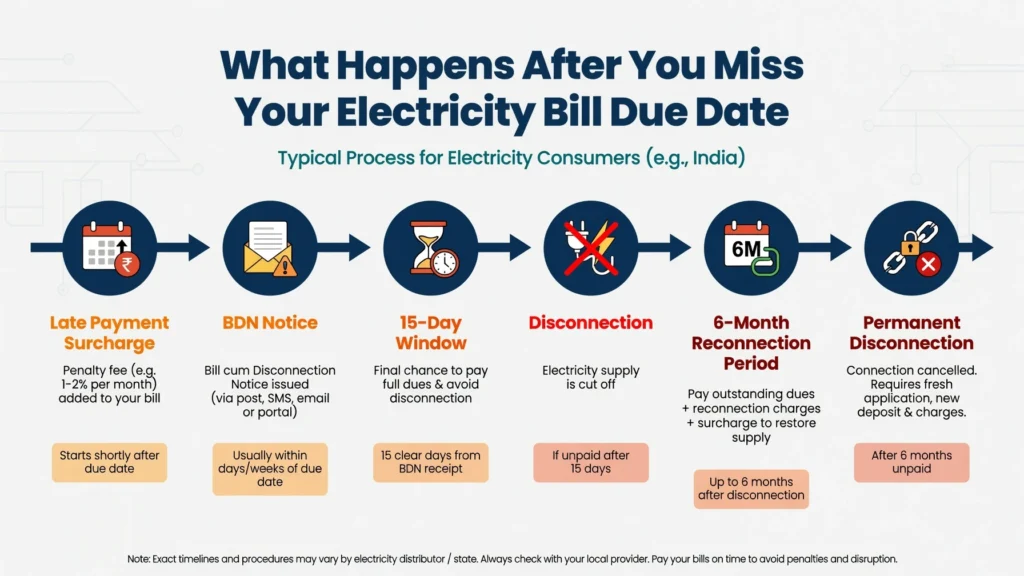
Under Section 56(1) of the Electricity Act, 2003, your electricity company is legally required to give you a written notice of at least 15 clear days before disconnecting your supply. This notice must state the outstanding amount, payment instructions, and the scheduled disconnection date. Disconnecting without this notice is illegal.
If you miss your due date, here’s what typically happens:
Your bill starts accumulating a Late Payment Surcharge (BPSC). For example, TANGEDCO in Tamil Nadu applies a monthly surcharge of 1.5% on the outstanding balance. Other boards have similar charges.
After the due date passes, your electricity board issues a Bill-cum-Disconnection Notice (BDN). This starts your 15-day grace window. If you still don’t pay within those 15 days, they can physically disconnect your supply usually by removing the fuse link or meter.
After disconnection, you have up to six months to pay and reconnect. If six months pass with no payment, the connection is classified as permanently disconnected, your account is closed, and the board can initiate legal recovery proceedings. The outstanding dues stay attached to the property itself (not just to you personally) so even new owners or tenants of that property may be required to clear old dues before getting a new connection.
If you believe your bill is wrong maybe there’s a calculation error or a meter reading mistake you should not simply refuse to pay. Pay the bill “under protest” and file a formal dispute. You can pay either the full disputed amount or an amount equal to your average monthly bill for the last 6 months (whichever is lower). Once you file this payment under protest, the electricity board cannot disconnect your supply while the dispute is being reviewed.
If they still disconnect illegally, you have strong legal remedies. You can approach the Consumer Grievance Redressal Forum (CGRF) established under Section 42(5) of the Electricity Act, escalate to the Electricity Ombudsman, or file a complaint in a Consumer Court. Consumer forums and courts have penalized DISCOMs in cases of unlawful disconnection, including ordering compensation for each day the supply remained cut off without proper notice. The exact penalty depends on the facts of each case, so if you believe you were disconnected illegally, keep your notice records and consult the CGRF or a consumer lawyer about what compensation may apply.
The Highest Electricity Bill in India And the Wildest Billing Errors
Here’s something interesting while we’re on the topic of electricity bills.
The highest reported electricity bill for an Indian residence belongs to industrialist Mukesh Ambani’s 27-storey home, Antilia, in South Mumbai. Media reports on the building’s first electricity bill put its consumption at approximately 6,37,240 units roughly equivalent to the combined consumption of 7,000 average middle-class households with a bill of around ₹70 lakh.
But not all extreme bills are legitimate. India has seen some jaw-dropping billing errors over the years:
A consumer in Gwalior, Madhya Pradesh received a bill for ₹3,419 crore later corrected to ₹1,300, after a meter reader entered the wrong number into the reading field. A resident of Hamirpur, Himachal Pradesh received a bill for ₹210 crore (actual bill: around ₹4,046) due to a software glitch. A woman in Tirunelveli, Tamil Nadu received a bill for ₹1.61 crore when her meter reading of 14,109 kWh was accidentally entered as 1,410,907 kWh.
These errors are rare, but they do happen. If you ever receive an obviously wrong bill, don’t panic and definitely don’t pay it without disputing it first. Contact your local electricity board office immediately, pay under protest if needed, and follow the formal dispute process described above.
Also always be alert for SMS or WhatsApp scams claiming your electricity will be disconnected at a specific time unless you call a number or pay a small “verification fee.” Legitimate electricity boards never send disconnection warnings from personal 10-digit mobile numbers, never ask for small verification fees over the phone, and never ask you to download remote-access apps like AnyDesk or TeamViewer. If you get such a message, ignore it and report it to your local cybercrime helpline.
State-Wise Electricity Bill Payment Portals
Official DISCOM websites for the states with the highest reader volume — tap a portal name to open it directly.
| State / UT | Electricity Board (DISCOM) | Official Portal |
|---|---|---|
| Maharashtra | MSEDCL (Mahavitaran) | mahadiscom.in |
| Gujarat (Ahmedabad, Surat, Gandhinagar) | Torrent Power | connect.torrentpower.com |
| Gujarat (rest of state) | UGVCL / PGVCL / DGVCL / MGVCL | portal.guvnl.in |
| Tamil Nadu | TANGEDCO / TNPDCL | tnebnet.org |
| Karnataka | BESCOM | bescom.karnataka.gov.in |
| Uttar Pradesh | UPPCL | uppclonline.com |
| Delhi (South, West, East, Central) | BSES Rajdhani (BRPL) | bsesdelhi.com/web/brpl |
| Delhi (Central, East) | BSES Yamuna (BYPL) | bsesdelhi.com/web/bypl |
| Delhi (North) | Tata Power Delhi (TPDDL) | tatapower-ddl.com |
| West Bengal (outside Kolkata) | WBSEDCL | portal.wbsedcl.in |
| West Bengal (Kolkata & Howrah) | CESC | cesc.co.in |
| Punjab | PSPCL | pspcl.in |
| Kerala | KSEB | kseb.in |
| Telangana | TSSPDCL / TSNPDCL | tssouthernpower.com |
| Odisha | TPCODL / TPWODL / TPNODL / TPSODL | tpcentralodisha.com |
| Assam | APDCL | apdcl.org |
India has over 40 electricity distribution companies once you count every state and union territory, so this isn’t exhaustive — just the boards covering the largest number of readers. If yours isn’t listed, the correct portal is always printed on your physical bill next to your Consumer Number.
India has over 40 electricity distribution companies once you count every state and union territory, so this isn’t exhaustive just the boards covering the largest number of readers. If yours isn’t listed, the correct portal is always printed on your physical bill next to your Consumer Number.
Quick Tips Before You Pay Your Electricity Bill Online
A few practical tips that will save you headaches:
Always double-check the Consumer Number you enter. A wrong digit means your payment goes to someone else’s account and getting it reversed takes time. Keep a screenshot or download the PDF receipt after every payment. Most apps give you this option. If you’re setting up autopay or a reminder, set it 3–4 days before the due date not on the due date itself to account for any technical delays. If you’re paying a very large bill (above ₹50,000), a direct bank NEFT transfer to your DISCOM’s official account number is often more reliable than third-party apps. Check your electricity board’s official website for details on how to find your consumer number if you’ve misplaced your bill.
If electricity isn’t the only utility bill giving you trouble, it’s worth checking your LPG gas subsidy eligibility as well it’s a quick check and an easy way to save a bit more every month.
Final Thoughts
Paying your electricity bill online in India has never been easier. Whether you use Google Pay, PhonePe, Paytm, your bank app, or your electricity board’s own website the whole process takes less than two minutes once you know your Consumer Number.
The days of standing in queues are over. And with the right credit card or payment strategy, you can even earn cashback or rewards on bills you were going to pay anyway.
Electricity Bill Payment: Frequently Asked Questions
Clear, authoritative guidance on payment gateways, dispute management, legal regulations, and tariff structures across India.
Payment Basics
Can I pay my electricity bill online in India?
Yes. Online utility settlement is fully integrated via Bharat Connect (formerly BBPS), an interoperable platform managed by NPCI that links thousands of DISCOMs to certified digital payment applications and direct banking portals.
Which platforms and payment channels are recommended?
Standard UPI applications (Google Pay, PhonePe, Paytm) provide instant receipt generation. For zero-fee processing, direct utility web portals via net banking or RuPay debit cards are the standard baseline.
Are convenience fees charged on online bill settlements?
Direct DISCOM portals typically charge zero convenience fees when using RuPay cards or net banking. Select third-party aggregator apps may apply a nominal surcharge depending on the payment instrument utilized.
Can payments be completed without third-party mobile apps?
Yes. State electricity boards and private distribution companies operate dedicated web portals with “Quick Pay” features requiring only your Consumer Number or Service Identifier to generate and clear the outstanding invoice.
Non-Payment & Statutory Regulations
What legal procedure occurs following a default on electricity dues?
Unpaid invoices accrue a late payment surcharge. If the balance remains outstanding, a statutory Bill-cum-Disconnection Notice is issued granting a compliance window prior to physical disconnection of the service line.
Can a power utility disconnect supply without prior notice?
Under Section 56(1) of the Electricity Act, 2003, utilities are legally mandated to serve a minimum of 15 clear days’ written notice before disconnecting service for billing defaults. Immediate disconnection is permitted strictly in instances of verified power theft, tampering, or acute safety hazards.
What legal recourse exists if an invoice amount is grossly inaccurate?
Consumers should lodge a formal dispute in writing with the Consumer Grievance Redressal Forum (CGRF). Submitting a payment “under protest” (calculated against historical monthly averages) prevents unilateral disconnection while the investigation proceeds.
How are payment discrepancies, overpayments, or underpayments adjusted?
Overpayments are credited toward the subsequent billing cycle as a ledger balance. Underpayments carry forward as arrears subject to statutory interest until cleared.