
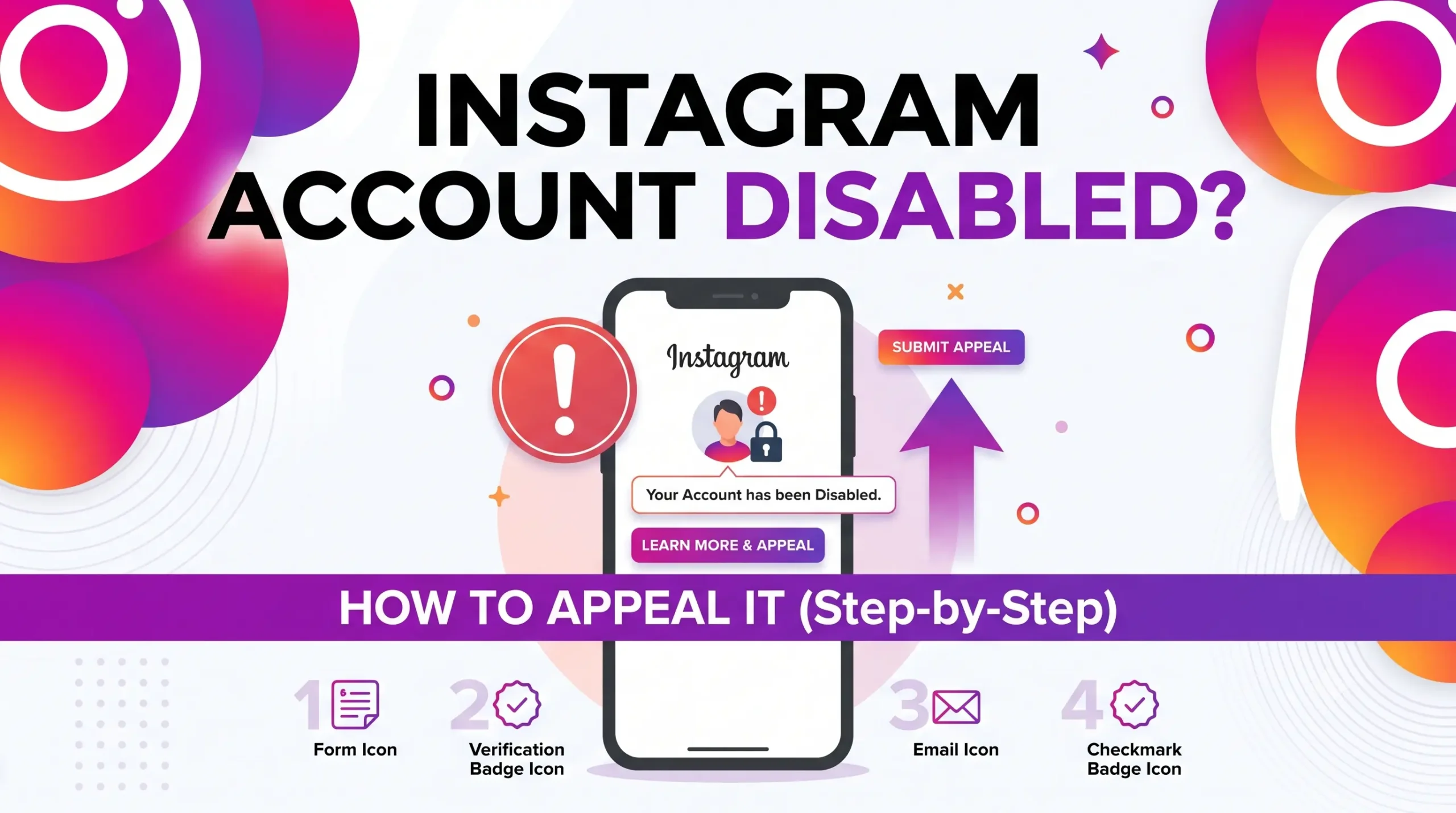
If Instagram just told you your account is disabled, suspended, or locked, the most important thing is figuring out exactly which situation you’re in because each one has a different fix, and using the wrong one wastes time you may not have.
This guide covers the current 2026 Instagram account disabled appeal process including where the appeal form actually lives now, what Instagram’s confusing “180 days” message means, and some of the misinformation circulating online, including “official appeal form” links that no longer work.
Quick Answer
Open the Instagram app and try to log in. If you see a message like “We’ve Disabled Your Account” or “We Suspended Your Account,” look for a Disagree with Decision or Request Review option and follow the on-screen steps, including any identity verification. This in-app flow is currently the most reliable way to start an appeal.
If the app doesn’t show an appeal option, use Instagram’s official Help Center at help.instagram.com rather than any specific “appeal form” link you find in a blog post or video as explained below, several widely shared “official” links no longer work.
If your password stopped working and you never saw a disable notice, you may be dealing with a hacked account instead. Go straight to instagram.com/hacked.
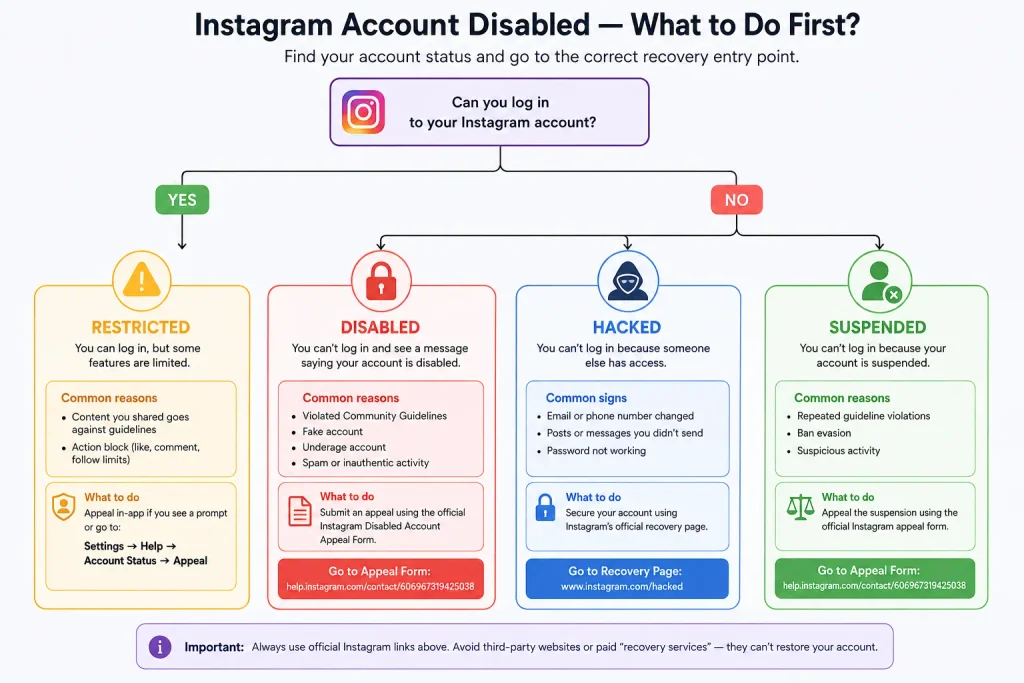
Disabled, Suspended, Hacked, or Restricted? Know Which One You Have
Instagram uses these terms loosely in casual conversation, but they describe different situations with different recovery paths. Using the wrong one is a common reason appeals go nowhere.
Disabled account. Instagram’s systems (automated or after human review) decided your account violated its rules. You’ll see a message like “We’ve Disabled Your Account for Violating Our Terms” when you try to log in.
Suspended account. A related but distinct status, often shown with a message such as “We Suspended Your Account” and a countdown (“X days left to appeal”). More on what that countdown really means below.
Hacked or compromised account. Someone else changed your password, email, phone number, or two-factor authentication. You’ll typically see “incorrect password” errors, or discover your linked email/phone has been swapped out without ever seeing a disable notice. This needs Instagram’s dedicated recovery flow, not a policy appeal.
Temporarily restricted. You can still log in, but specific actions (commenting, liking, following, sending DMs) are blocked for a short period. This usually happens automatically after unusual activity (rapid following/unfollowing, high message volume) and typically clears on its own within a day or so no appeal needed.
If you’re not sure which applies, the deciding question is simple: can you still log in with your correct password? If yes and nothing looks disabled, you likely have a temporary restriction. If no, and you never got a disable notice, treat it as a compromised account. If you saw an explicit disable or suspension message, it’s a policy enforcement action.
Why Instagram Disables Accounts
Most disablements come from Instagram’s automated detection systems rather than a person manually reviewing your profile. Common triggers reported by affected users and covered in Instagram’s own guidance include:
- Behavior that looks automated or spammy rapid follows/unfollows, high-volume commenting or messaging in a short window, or third-party growth/bot apps connected to your account.
- Content misclassified by automated filters this can happen with fitness, medical, or artistic content that visual-recognition systems misread, or with satire and commentary that text filters misread as harassment.
- Mass reporting a sudden spike in reports against your account can trigger an automatic review or lockout, even if the reports aren’t accurate.
- Linked-account issues because Instagram, Facebook, and Threads share an Accounts Center, an enforcement action on one linked account can sometimes affect others tied to it.
- Genuine policy violations impersonation, coordinated inauthentic behavior, or content that breaks Community Guidelines.
For the most serious policy categories child safety, terrorism or violent extremism, and coordinated fraud Meta’s own Transparency Center states that people can generally appeal enforcement decisions “unless there are extreme safety concerns.” In practice, appeals in these categories are reviewed far more cautiously and succeed less often than for routine policy flags, and some cases may not have a realistic path back at all.
It’s also worth knowing that 2026 has seen a well-documented wave of automated child-safety enforcement mistakenly flagging ordinary content family photos, fitness posts, and similar with no connection to actual abuse material. If you receive a notice like this and are certain nothing you’ve posted matches the description, it’s still worth filing the standard appeal (Step 1 below) rather than assuming you have no options; just expect a slower, more cautious review than for a routine policy flag.
Step-by-Step: How to Appeal a Disabled or Suspended Account
Step 1: Try the in-app appeal first
- Open the Instagram app on the phone you normally used to access the account.
- Try logging in with your username and password.
- When the disable or suspension notice appears, look for Disagree with Decision, Request Review, or a similar link.
- Follow the prompts. You may be asked to confirm a code sent by SMS or email, and in some cases to record a short video selfie so Instagram can match your face against photos already on your account.
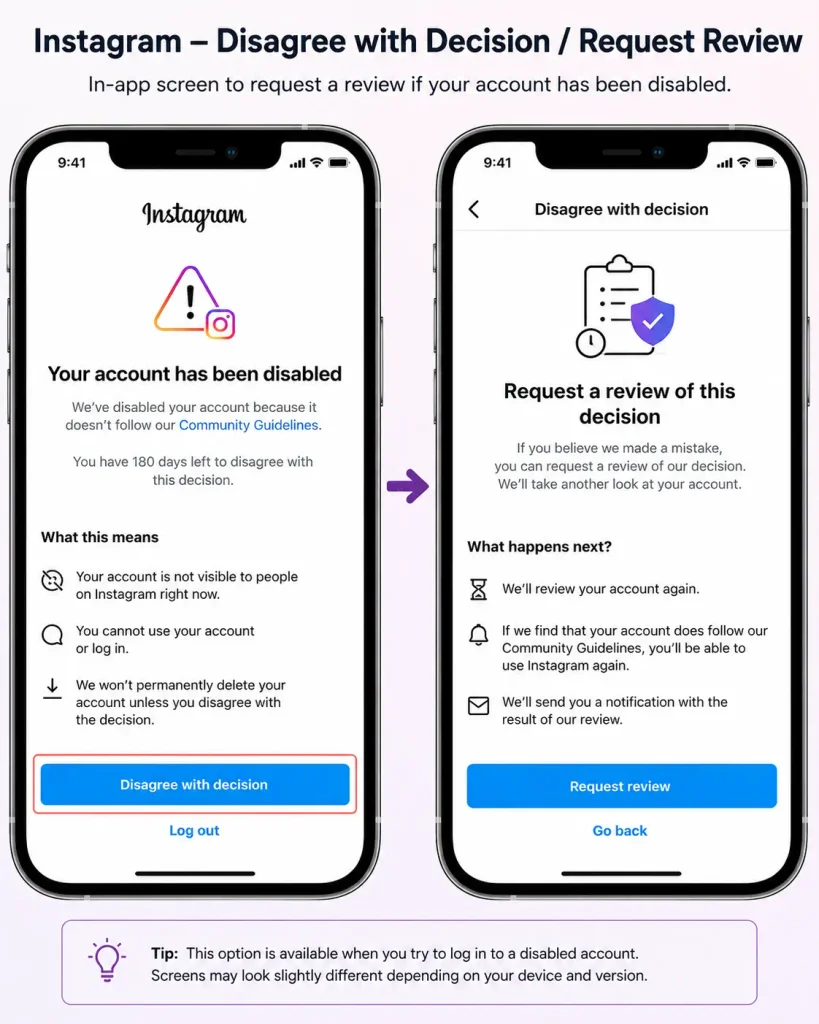
This in-app path is currently the route Instagram points most users toward, and it’s the fastest to start.
Step 2: If there’s no in-app option, use the official Help Center
If the app doesn’t show an appeal link, or the appeal fails, go to help.instagram.com in a browser and search for “disabled account” rather than typing in a specific numeric URL from a video or article. Meta periodically retires and replaces its old contact-form links, so a URL that worked for someone else last month may no longer function today. From the Help Center you can also reach Instagram’s dedicated portal for hacked or inaccessible accounts at instagram.com/hacked, which covers both compromised and disabled accounts.
A note on “official appeal form” links: A large amount of content online including AI-written blog posts shares a specific numeric web-form link and calls it the current official Instagram appeal form. We checked one of the most commonly repeated links directly, and as of this writing it simply redirects to the Help Center homepage rather than an appeal form. Don’t treat any specific numeric link you find online as guaranteed to work; start from help.instagram.com itself and navigate from there, or use the in-app flow.
Step 3: Complete identity verification if requested
After you submit an appeal, Instagram may follow up by email (from an address ending in @mail.instagram.com or @support.facebook.com) asking you to confirm your identity. This commonly involves writing a code they provide on a plain piece of paper, then photographing yourself holding it so your face and the code are both clearly visible no filters, sunglasses, or hats. Reply directly to Instagram’s email with the photo attached as instructed.
Step 4: Write a clear, specific appeal not an emotional one
Reviewers respond better to a short, factual explanation than to a long emotional plea. A useful appeal typically:
- States plainly that you believe the enforcement was made in error.
- If you know which policy was cited, explains briefly why your account or content doesn’t fit that description.
- Mentions relevant context an automated system wouldn’t have caught (for example, that the account was compromised, or that flagged content was clearly satirical, educational, or artistic).
- Avoids generic template language Instagram’s systems are known to flag appeals that look copy-pasted from a “how to appeal” guide.
What the “We Suspended Your Account 180 Days” Message Actually Means
This screen causes a lot of unnecessary panic, so it’s worth explaining carefully and being honest about what Instagram hasn’t officially clarified.
Based on widespread, consistent user reports (Instagram has not published an official technical breakdown), the 180-day figure appears to function as a data retention countdown: how long Instagram will keep your account’s data before permanent deletion if the suspension is never overturned. It is not a guarantee that appealing at any point in that window gets equal treatment.
One detailed independent write-up of this pattern (not an Instagram-published source) puts the realistic window for a meaningful first appeal at around 30 days inside that countdown, after which review options are widely reported to narrow. Treat that 30-day figure as a useful early-warning estimate from a single piece of outside analysis, not a confirmed Instagram rule.
The exact mechanics also appear to vary by region: some EU/UK users report longer, more structured contest windows and formal statements of reasons, consistent with the Digital Services Act requirements covered later in this guide, while reports from users elsewhere describe shorter, less transparent windows. Instagram hasn’t published an official region-by-region comparison, so don’t assume your window matches what you read about someone else’s case.
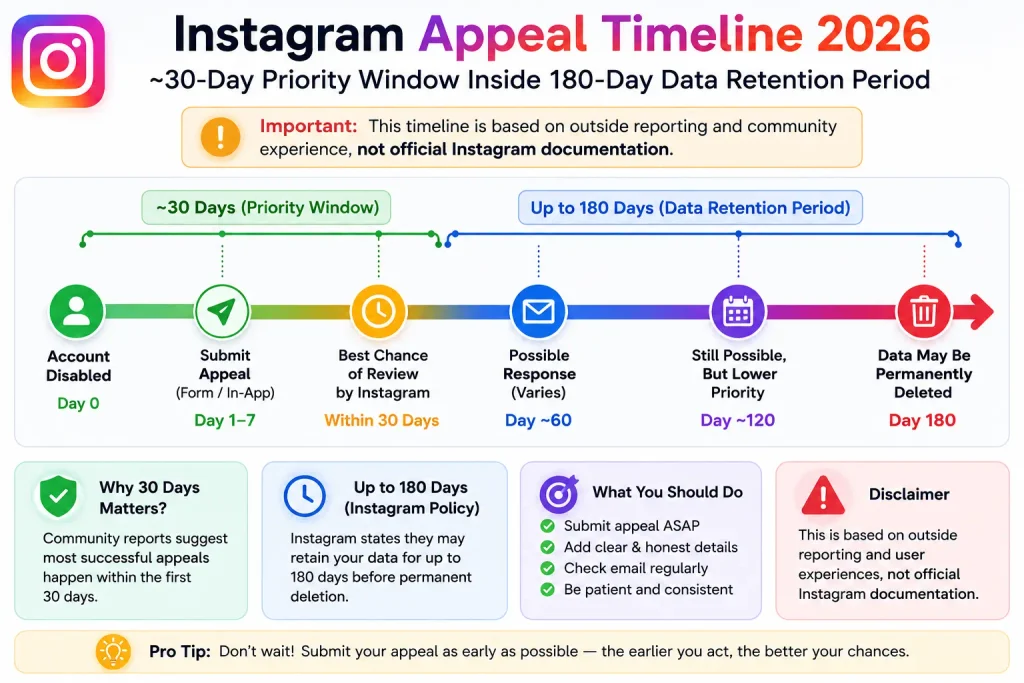
Because Instagram doesn’t publish exact mechanics for this, treat the specific countdown shown on your own screen as the only number that matters for your case, and act as early as possible rather than assuming you have the full stated period to act.
If You Were Hacked, Not Disabled
If someone else changed your password, linked email, phone number, or two-factor authentication, don’t use the policy-appeal process go to instagram.com/hacked. This is Instagram’s dedicated portal for account access issues, including compromised accounts, and it will route you through identity verification (often including a video selfie) to prove you’re the real account owner.
While you wait:
- Check whether you can still request a password reset using your original email or phone number.
- If you downloaded an archive of your account data before losing access, keep it it can help prove account history if needed.
- Don’t pay anyone claiming they can “restore access for a fee.” No legitimate third party has backend access to Instagram’s systems (see the scam warning below).
Can a Permanently Disabled Instagram Account Be Recovered?
Once Instagram’s decision moves from “suspended, pending appeal” to “permanently disabled,” recovery gets much harder but timing matters more than most guides admit.
While your account’s data still exists on Instagram’s servers, restoring it remains technically possible even after a permanent-disable label. Once that data is actually deleted the point the suspension countdown is counting down to recovery is no longer a technical possibility, no matter what any appeal, paid service, or legal letter promises. No legitimate method can bring back an account after that point.
If you’re still inside the countdown window shown on your own screen, focus on:
- Submitting the strongest, most specific appeal you can (see Step 4 above) rather than repeating a generic one.
- If you’re in the EU, filing with Appeals Centre Europe (below) in parallel rather than waiting for Instagram’s decision first reviews there can take weeks.
Be extremely skeptical of anyone claiming they can revive an account after its data has genuinely been deleted. That claim alone is a strong sign of a scam see the warning below.
If Standard Appeals Don’t Work
EU residents: Appeals Centre Europe
If you live in the EU, you have an option most guides don’t mention: Appeals Centre Europe, an independent body certified under Article 21 of the EU’s Digital Services Act. It reviews disputed account suspensions and removals on Facebook, Instagram, TikTok, and YouTube, free of charge, and platforms are legally required to engage with it in good faith. You can submit a case at appealscentre.eu.
It’s worth setting realistic expectations, though: a transparency report published by Appeals Centre Europe in 2026 found that Meta supplied the requested case evidence in fewer than 100 of over 4,600 eligible Facebook and Instagram disputes meaning many cases can’t be fully reviewed simply because Meta doesn’t cooperate. Its decisions are also non-binding, though Meta is required to respond to them. It’s a legitimate, free option worth trying, not a guaranteed fix.
Content-specific decisions: Meta Oversight Board
If your case involves a specific piece of content Instagram removed or left up, and you’ve exhausted Instagram’s own appeal process, you can apply to the Meta Oversight Board at oversightboard.com. Unlike Appeals Centre Europe, its decisions are binding on Meta but it only takes a limited number of cases and isn’t a general-purpose account-recovery channel.
Meta Verified support
If you or someone you know has an active Meta Verified subscription on a linked account, its live chat support can sometimes reach a human agent who is able to escalate a case internally. Results here are inconsistent treat it as one more avenue to try, not a reliable guarantee.
Watch Out for Fake “Instagram Recovery” Services
Search “disabled Instagram account” on social platforms or forums and you’ll find people offering to restore your account for a fee, often citing a “contact” or “cyber analyst” with special access. No legitimate individual or company has backend access to Instagram’s account systems. These offers are scams designed to collect upfront payment (often gift cards or cryptocurrency) or to phish your login credentials and identification documents through fake forms that mimic Instagram’s real Help Center. Only use help.instagram.com, instagram.com/hacked, appealscentre.eu, and oversightboard.com never a third-party “recovery agent.”
After You Get Your Account Back
Once access is restored, a few quick steps reduce the chance of it happening again:
- Turn on two-factor authentication using an authenticator app (not SMS, which is vulnerable to SIM-swapping).
- Go to Settings → Website Permissions → Apps and Websites and remove any third-party growth, scheduling, or automation tools you don’t recognize or no longer use.
- Make sure your recovery email and phone number are current and secured with their own two-factor authentication.
- Avoid logging in over public Wi-Fi or through VPN services that frequently change your apparent location, since that pattern can itself trigger security flags.
Frequently Asked Questions
Clear answers on appeal response times, account policies, and official support options for disabled Instagram accounts.
How long does an Instagram appeal take?
Instagram doesn’t publish a fixed timeframe, and cases vary widely — some are resolved within days, others take much longer or receive no response at all. Be wary of any guide that states a precise turnaround time as fact.
Can I create a new Instagram account while I wait?
You can, but using the same email, phone number, or device as your disabled account can cause the new one to be flagged or suspended as well. If you go this route, use different sign-up details.
Will Instagram ever explain exactly why my account was disabled?
Sometimes the notice cites a general policy category; often it doesn’t go into detail. This is a common frustration with automated enforcement.
Is there a phone number to call Instagram support?
Instagram doesn’t publish a general support phone number for account disputes. Support is primarily handled through the app, the Help Center, and (for Meta Verified subscribers) live chat.
Conclusion
The fastest, safest path back into a disabled or suspended Instagram account is Instagram’s own in-app appeal flow, followed by the official Help Center if that isn’t available. Be skeptical of specific “appeal form” links shared in videos or articles Meta changes these regularly, and some of the most widely repeated ones no longer work. If your account was hacked rather than disabled, go straight to instagram.com/hacked. And if you’re in the EU and standard appeals stall, Appeals Centre Europe is a real, free option just go in with realistic expectations about Meta’s cooperation rate.