

If your FASTag has stopped accepting recharges, or you’ve received a message about incomplete KYC, the fix is usually a short online form but only if you go to the right portal. Because FASTag isn’t issued by one single company, there’s no single “FASTag website.” IHMCL issues some tags directly; a number of authorised banks and NBFCs issue the rest. This guide shows you how to find the correct portal for your tag, what to upload, and how long it takes.
It also clears up something most guides get wrong in 2026: FASTag KYC and FASTag KYV are not the same thing, and a recent government policy change means the older, stricter process many articles still describe no longer applies the way it used to for private cars.
Quick Answer
- Check who issued your FASTag IHMCL directly, or a bank (SBI, ICICI, HDFC, Axis, Paytm, etc.). Not sure? Check the app or website you used to buy or last recharge the tag, or look up your vehicle registration number on the NPCI status tool below, which shows the issuing bank.
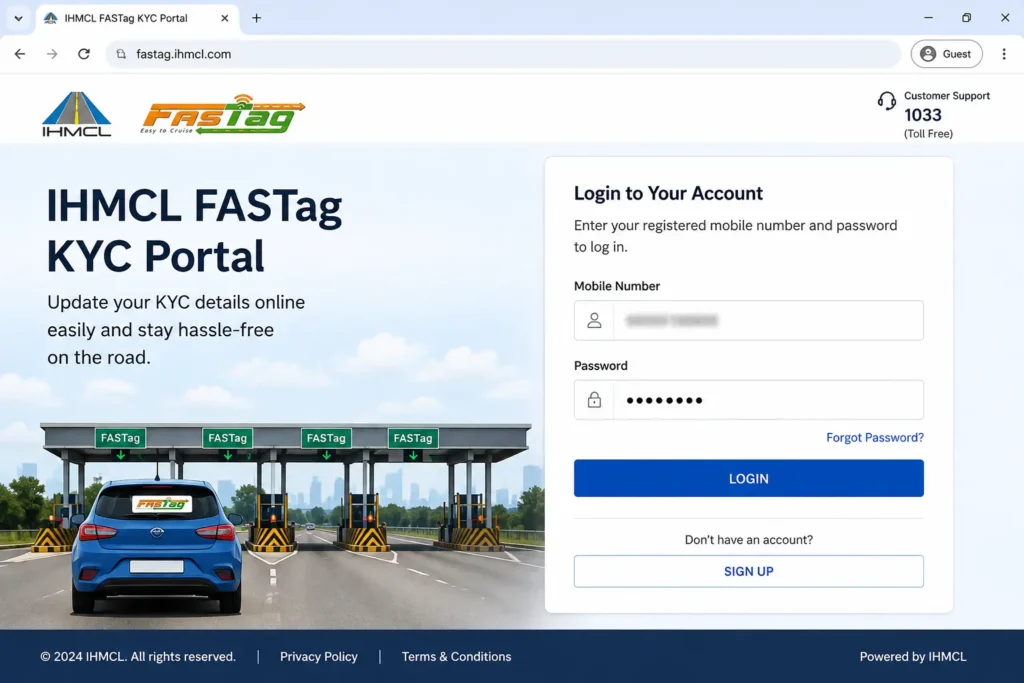
- IHMCL-issued tags: log in at fastag.ihmcl.com → My Profile → KYC → upload documents.
- Bank-issued tags: log in to that bank’s own FASTag portal or banking app → FASTag section → KYC/Profile Update.
- Have ready: vehicle RC (front and back), a masked Aadhaar or another ID proof, address proof, and a passport-size photo.
- Most updates are reviewed within a few working days to 7 working days.
KYC vs. KYV Why This Distinction Matters in 2026
People often use “FASTag KYC” as a catch-all term, but two separate verification steps are involved, run by two different regulators:
- KYC (Know Your Customer) confirms who you are. It’s a Reserve Bank of India requirement that applies to any prepaid payment instrument, including a FASTag wallet. Your KYC level (Minimum or Full) determines how much balance you can hold and reload.
- KYV (Know Your Vehicle) confirms which vehicle the tag is fitted to. It’s an NHAI/IHMCL requirement that matches your FASTag to your vehicle registration number (VRN) in the government’s VAHAN database.
This matters because the rules changed recently. According to a Ministry of Road Transport and Highways statement issued through the Press Information Bureau, NHAI discontinued the mandatory KYV process for new car, jeep, and van FASTags with effect from 1 February 2026. For FASTags already issued to private cars, KYV is no longer a routine requirement it’s now only carried out if a specific complaint comes in, such as a loose tag, incorrect issuance, or suspected misuse. In exchange, banks must now verify a vehicle against the VAHAN database before activating a new tag, rather than after.
Commercial vehicles (buses, trucks, multi-axle vehicles) are not covered by this relaxation and still go through vehicle verification.
What this means for you in practice: if you own a private car and your FASTag is already active, you most likely don’t need to chase a separate “vehicle verification” step anymore. What you may still need to complete is the KYC side the identity and wallet-tier verification described in the rest of this guide, especially if you want to move from Minimum KYC to Full KYC or your account was flagged for incomplete documentation.
Do You Need to Update Your FASTag KYC?
You likely need to act if any of the following applies:
| Situation | What it usually means |
|---|---|
| Wallet reloads are being capped or blocked | Your account is on Minimum KYC and has hit its balance or monthly limit |
| You bought your vehicle used or transferred ownership | The tag profile still shows the previous owner’s details |
| Your FASTag was issued against a chassis number | It needs to be updated once you receive the vehicle’s registration certificate (RC) |
| You received an SMS/email about incomplete KYC | Your issuer has flagged your profile for missing or unverifiable documents |
| Your tag shows as blacklisted or suspended despite a positive balance | Often linked to unresolved KYC, not a balance problem |
If none of these apply and your tag is recharging and working normally, there’s a reasonable chance no action is needed right now check your status first (see below) before assuming you must resubmit documents.
Minimum KYC vs. Full KYC
| Feature | Minimum KYC | Full KYC |
|---|---|---|
| Maximum balance at any time | Up to ₹10,000 | Up to ₹1,00,000 |
| Monthly reload limit | Capped, generally ₹10,000 | No monthly cap |
| Verification method | Basic details, self-declared ID | Officially Valid Documents (OVD) or Video KYC |
| Fund transfer on closure | Restricted | Full transfer allowed back to source account |
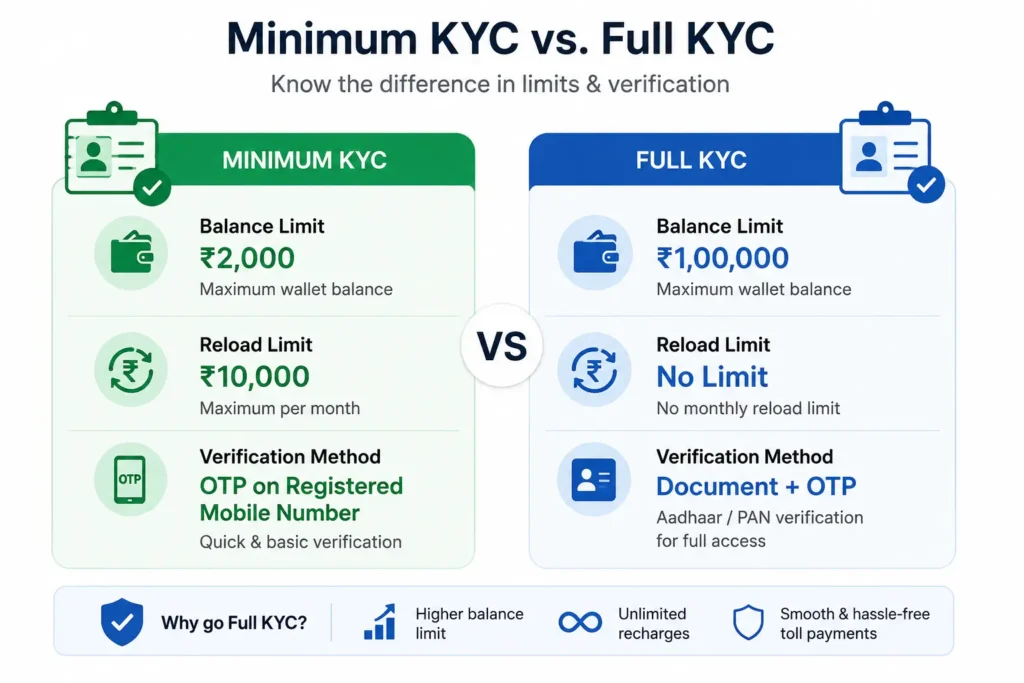
These balance limits are consistent with the Reserve Bank of India’s framework for prepaid payment instruments and are confirmed on IHMCL’s and multiple banks’ own FASTag pages. Some minimum-KYC prepaid accounts are also subject to a validity/reload cut-off after a set period unless upgraded to Full KYC if your account has been flagged this way, your issuer’s notice or portal will state the exact deadline that applies to your account, since this can vary by issuer.
Documents You’ll Need
Individual vehicle owners:
- ID proof: PAN card, passport, voter ID, driving licence, or Aadhaar
- Address proof: Aadhaar, passport, driving licence, voter ID, or a utility bill less than 3 months old
- Vehicle Registration Certificate (RC) front and back, clearly legible
- A recent passport-size photograph
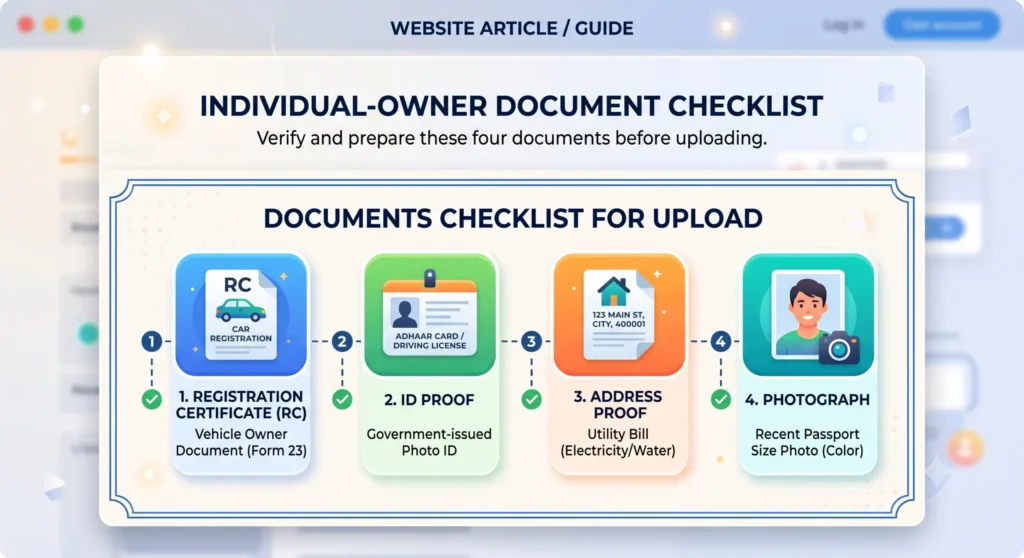
Important: if you upload Aadhaar as proof, mask the first 8 digits so only the last 4 are visible. Most issuers automatically reject unmasked Aadhaar uploads.
Commercial/corporate vehicle owners:
- Certificate of Incorporation, GST certificate, or partnership deed
- PAN card in the entity’s name
- An authorization letter naming the person permitted to manage the FASTag account
- ID and address proof of that authorized signatory
- RC copies for each vehicle linked to the account
Official Portals Use the One That Matches Your Issuer
| Tag issued by | Where to update KYC |
|---|---|
| IHMCL / NHAI directly (bought at a toll plaza, petrol pump, or ihmcl.com) | fastag.ihmcl.com |
| Your bank (SBI, ICICI, HDFC, Axis, Paytm Payments Bank, etc.) | That bank’s own FASTag portal, reached through its official website or mobile banking app |
| Any issuer to check which tags are linked to your vehicle | NPCI’s NETC FASTag status page, reachable from npci.org.in |
A practical note on bank portals: subdomains occasionally change. SBI, for example, has moved its FASTag portal at least once in recent history. Rather than typing a bank portal address from memory or an old bookmark, it’s safer to reach it through your bank’s official website or banking app, where the current link is always kept up to date. This also protects you from look-alike phishing links sent by SMS claiming your FASTag will expire.
How to Update KYC on the IHMCL Portal
This applies if your FASTag was purchased directly from IHMCL, at a toll plaza, or at a fuel outlet (not through a bank).
- Go to fastag.ihmcl.com and select Login.
- Enter your registered mobile number and verify with the OTP sent to your phone.
- On the dashboard, open My Profile.
- Select the KYC tab. It will show your current status (e.g., “Minimum KYC”).
- Choose your customer type Individual or Corporate.
- Fill in the requested personal details exactly as they appear on your ID documents.
- Upload the RC (both sides), your ID proof, address proof, and photograph.
- Confirm the self-declaration and submit. You’ll get an SMS reference for tracking.
According to IHMCL, KYC requests submitted through the portal are processed within a maximum of 7 working days.
How to Update KYC for a Bank-Issued FASTag
- Open your bank’s official FASTag portal or its mobile banking app.
- Log in with your NetBanking credentials, wallet ID, or registered mobile number and OTP.
- Look for FASTag → KYC Update or Customer Profile (menu wording varies by bank).
- Choose to either upload documents digitally, or complete Video KYC if your bank offers it.
- For Video KYC, keep your original PAN and Aadhaar on hand, allow camera/microphone access, and follow the agent’s instructions during the live call.
- Submit for review.
Bank-side reviews are often completed faster than IHMCL’s, but the exact timeline depends on the individual bank and whether you used document upload or Video KYC check your bank’s FASTag page or confirmation message for the specific window that applies to you.
How to Check Your FASTag KYC Status
Through your issuer’s portal: Log in (IHMCL or your bank) and open My Profile → KYC Status.
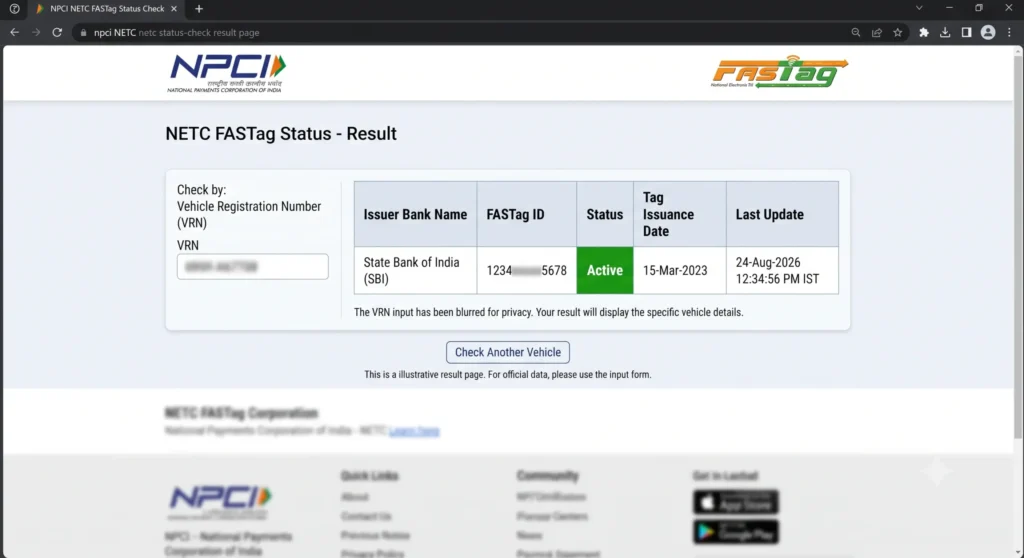
Through NPCI’s centralized checker: This tool looks up all FASTags linked to a vehicle, regardless of which bank issued them.
- Go to NPCI’s official NETC FASTag status page (linked from npci.org.in).
- Choose to search by Vehicle Registration Number or by your 16-digit NETC FASTag ID.
- Enter the captcha and submit.
- You’ll see the issuing bank, tag status, and issuance date for every tag linked to that vehicle useful for spotting duplicate tags under the “One Vehicle, One FASTag” rule.
What the Status Messages Mean
| Status | What it means | What to do |
|---|---|---|
| Full KYC / Active | Fully compliant, no reload cap | Nothing needed |
| Minimum KYC / Incomplete | Working but capped at ₹10,000 balance | Upgrade if you want higher limits |
| Pending Verification | Documents submitted, under review | Wait; most reviews finish within the timelines above |
| Blacklisted / Suspended | Blocked at toll plazas, may trigger double toll charged in cash | Resolve the flagged issue (KYC, balance, or duplicate tag) urgently |
| Deactivated / Closed | Permanently disabled | You’ll need a new FASTag |
If Your KYC Application Is Rejected
Common reasons and fixes:
- Unmasked Aadhaar re-upload with only the last 4 digits visible.
- Name mismatch between your RC and your ID proof this often happens after marriage or a legal name change. If it can’t be resolved online, visit your issuer’s branch with original documents for manual verification.
- Blurry or cropped scans rescan in good light with all four corners visible.
- Documents belonging to someone other than the registered owner the ID proof must match the RC unless you have formal authorization.
- Expired ID document submit a currently valid one.
After correcting the issue, log back in, remove the rejected file, and upload the corrected version rather than starting a new application.
Common Problems
OTP not arriving: Usually a network delay or an outdated registered mobile number. Wait a few minutes and retry; if it persists, your mobile number on file may need updating at a branch.
Same vehicle shows multiple tags: Check via the NPCI status tool, identify the tag you actually use, and contact the issuer of the older tag to request closure this avoids automatic flagging under the One Vehicle, One FASTag policy.
“Vehicle number already exists” error: This typically happens with used vehicles where a previous owner’s account is still linked. Contact your issuing bank with your RC to request reassignment.
Can’t log in to fastag.ihmcl.com with a bank-issued tag: That’s expected bank-issued tags are managed only on the issuing bank’s own portal, not IHMCL’s.
A Word on Scams
FASTag KYC has become a common phishing theme. Messages claiming your “FASTag will expire in 24 hours click here to update KYC” often lead to fake portals designed to steal ID or payment details. Genuine KYC updates are free and are only ever done through your issuer’s official app or website never through a link in an unsolicited SMS or a call asking for payment to “process” your KYC.
Frequently Asked Questions
Essential information on FASTag KYC compliance, vehicle verification rules, processing timelines, and status checks.
Is FASTag KYC free?
Yes. Neither IHMCL nor any issuing bank charges a fee to complete or update KYC. Any third party requesting payment to process your verification is fraudulent.
Do I still need to complete vehicle verification (KYV) for my car in 2026?
For most private vehicles with an already-active FASTag, no. NHAI made routine re-verification non-mandatory for active private cars from February 2026 onward, unless your tag has been flagged for a specific audit issue. Commercial vehicles remain subject to ongoing verification.
How long does FASTag KYC approval take?
Approvals typically take a few working days. IHMCL specifies a turnaround of up to 7 working days for portal submissions. Bank-issued tags often process faster, though exact timelines depend on your issuer.
What happens if I don’t update my KYC?
Your linked wallet balance may be capped at Minimum KYC thresholds, reloads can be restricted, or the tag may be blacklisted. A blacklisted or deactivated tag results in paying standard double-toll cash penalties at fee plazas until updated.
Can I check someone else’s FASTag status?
Yes. The official NPCI status portal queries tag health using only the vehicle registration number. The lookup returns the operational status (Active, Low Balance, or Blacklisted) without exposing any personal or financial records.
Related Guides
FASTag KYC is one of several recurring online verification and payment tasks Indian residents deal with. You may also find these FixMyDaily guides useful:
- How to pay your electricity bill online in India
- How to pay property tax online in India
- How to download your property tax receipt online
- How to check LPG gas subsidy eligibility
- How to get a police verification certificate online
- How to file a municipal complaint online
Before You Go
Bank portal addresses, exact processing windows, and specific balance ceilings can change always confirm the current figures on your issuer’s official app or website before relying on them, particularly if your bank isn’t listed by name above. If your KYC has been pending for more than the stated timeline, contact your issuer’s support line directly rather than resubmitting documents repeatedly.