

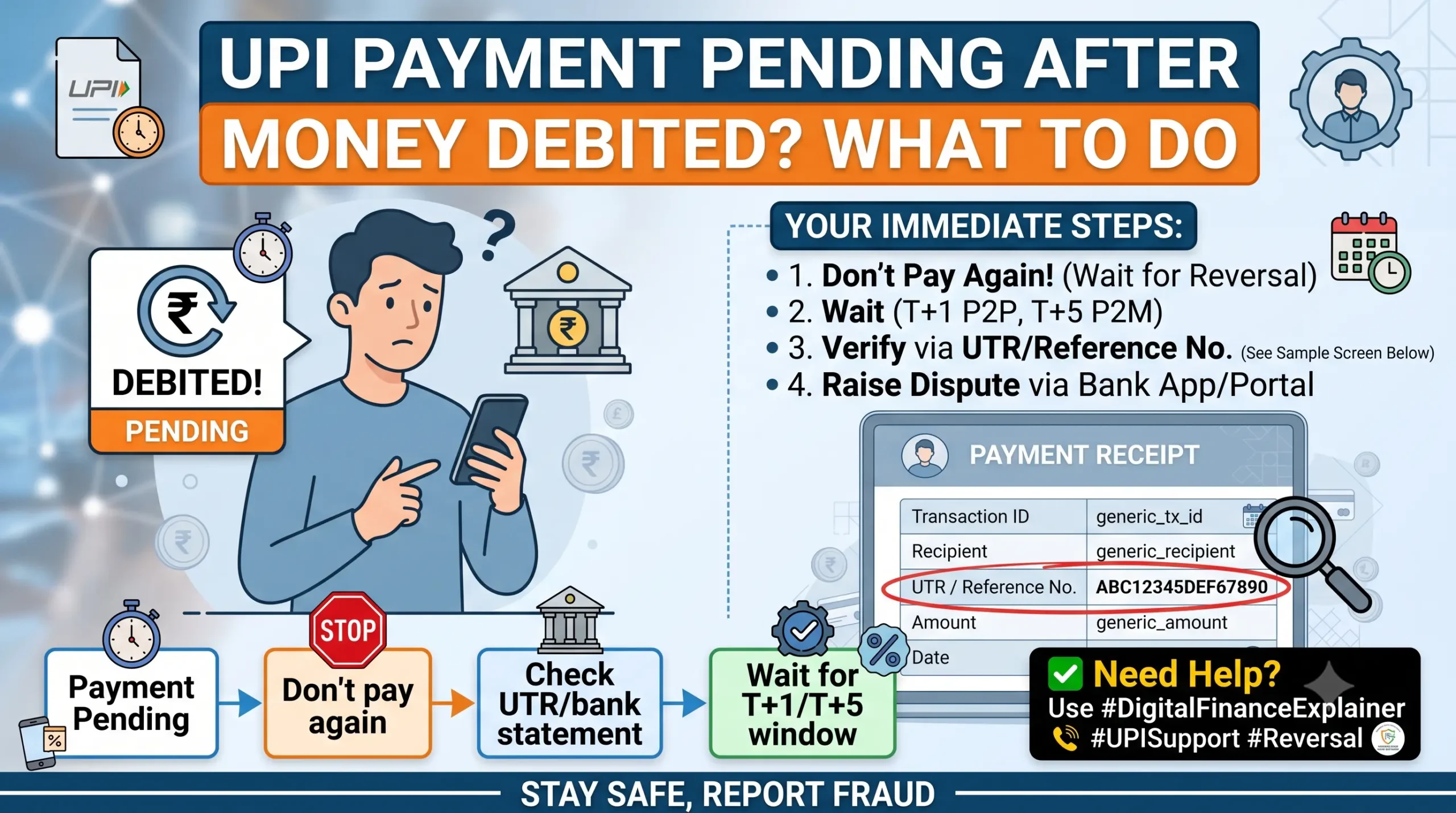
Your UPI app shows “Pending” or “Processing,” but the money has already left your account. This happens because of a communication delay between your bank, the NPCI switch, and the receiving bank not because your money has disappeared. Here’s what’s actually happening, what to do right now, and exactly when to escalate if the transaction doesn’t clear on its own.
Don’t Pay Again Yet Here’s Why
If you’re standing at a checkout and the payment is stuck on “Pending,” the safest move is to wait and verify before paying a second time, whether by cash, card, or another UPI transfer.
What happens if you pay twice
A “Pending” UPI transaction can still turn into a successful payment hours later, once the beneficiary bank’s servers catch up. If you’ve already paid the merchant again in cash or another instrument you can end up having paid twice for the same purchase. Recovering a duplicate payment from a small or informal merchant afterward is often far more difficult than waiting a few minutes to confirm the first payment’s status.
If a merchant insists on a second payment, a reasonable middle ground is to ask them to note down your transaction reference number and contact details so the duplicate amount can be settled once your first payment’s status is confirmed.
Where your money actually is right now
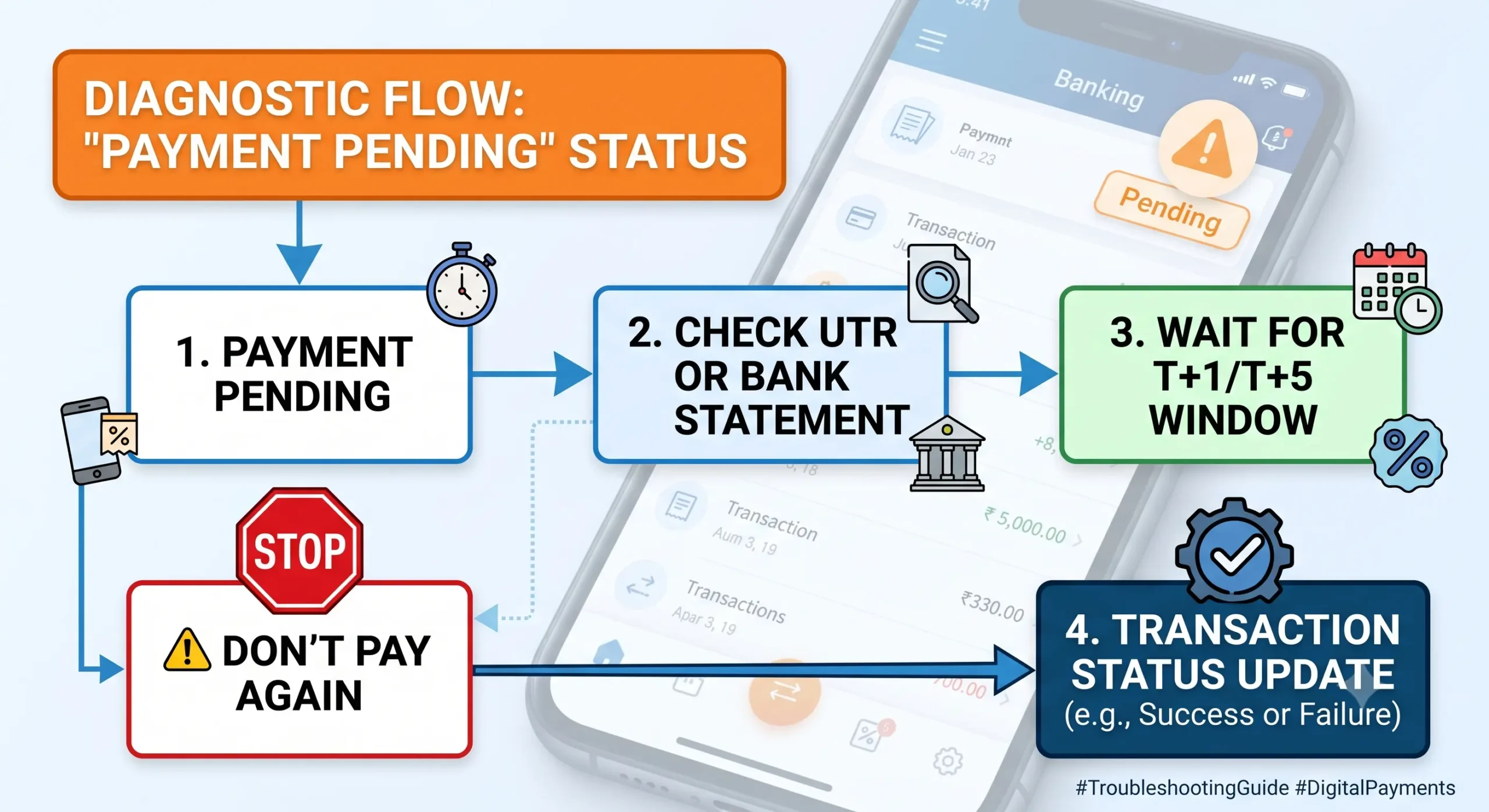
A UPI transaction moves through several systems: your UPI app → your bank → the NPCI switch → the receiver’s bank. When your bank confirms the debit but the receiving bank doesn’t confirm the credit in time (often because its servers are slow to respond within the payment network’s short timeout window), the transaction is marked “Pending” instead of “Success” or “Failed.” Your money isn’t sitting with the app (Google Pay, PhonePe, Paytm, etc. don’t hold your funds) it’s held within the banking settlement chain and is either credited to the receiver or automatically reversed to you.
How Long Does a Pending UPI Payment Take to Clear?
The Reserve Bank of India sets binding outer-limit timelines for this exact situation, under RBI Circular RBI/2019-20/67 (DPSS.CO.PD No.629/02.01.014/2019-20), “Harmonisation of Turn Around Time (TAT) and customer compensation for failed transactions.”
UPI Auto-Reversal & Compensation Framework
Mandated turnaround times and penalty compensation under RBI guidelines.
| Transaction Type | What Happened | Max Auto-Reversal Window | Compensation If Delayed |
|---|---|---|---|
| Person-to-Person (P2P) e.g., sending money to a friend or family member | Your account debited, receiver’s account not credited. | T + 1 calendar day | ₹100 for every day of delay beyond T+1, credited automatically. |
| Person-to-Merchant (P2M) e.g., paying a shop, restaurant, or online store | Your account debited, merchant confirmation not received. | T + 5 calendar days | ₹100 for every day of delay beyond T+5, credited automatically. |
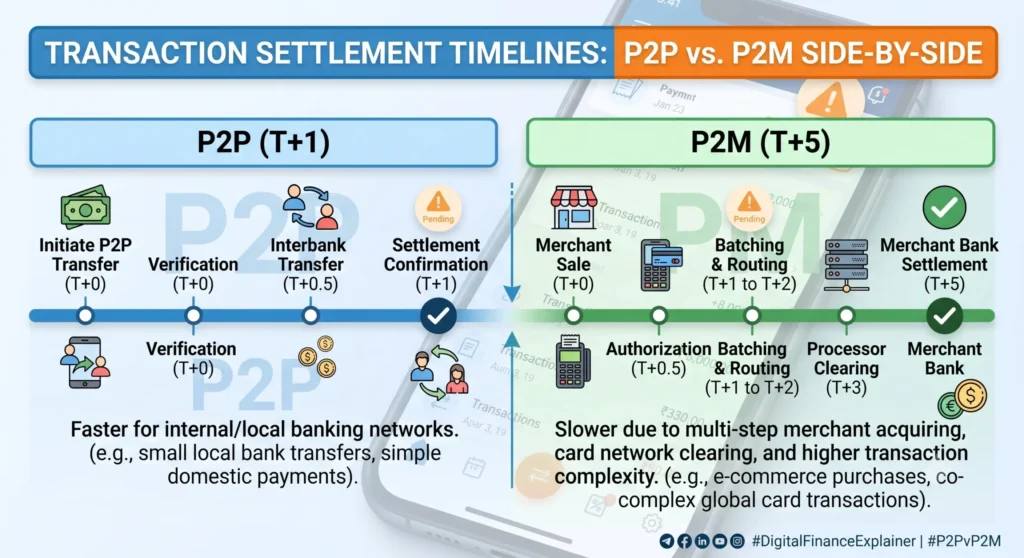
“T” is the calendar date of the transaction and includes weekends and public holidays the clock doesn’t pause. In practice, most pending transactions clear (either by crediting the receiver or reversing to you) within 24–48 hours, well inside these outer limits, because banks run automated reconciliation cycles multiple times a day. If your transaction is still unresolved after that window, you’re inside the regulator-mandated timeline to escalate, not just “waiting a bit longer.”
A common source of confusion: many articles quote a single “3 to 5 business day” refund window for all UPI issues. That figure usually describes commercial merchant refund policies (like an e-commerce return), not the RBI’s technical failure reversal rule above. If your payment is stuck on “Pending” because of a network or bank-side issue not because you’re waiting for a merchant to approve a return the T+1/T+5 rule is what applies.
How to Check Your UPI Transaction Status
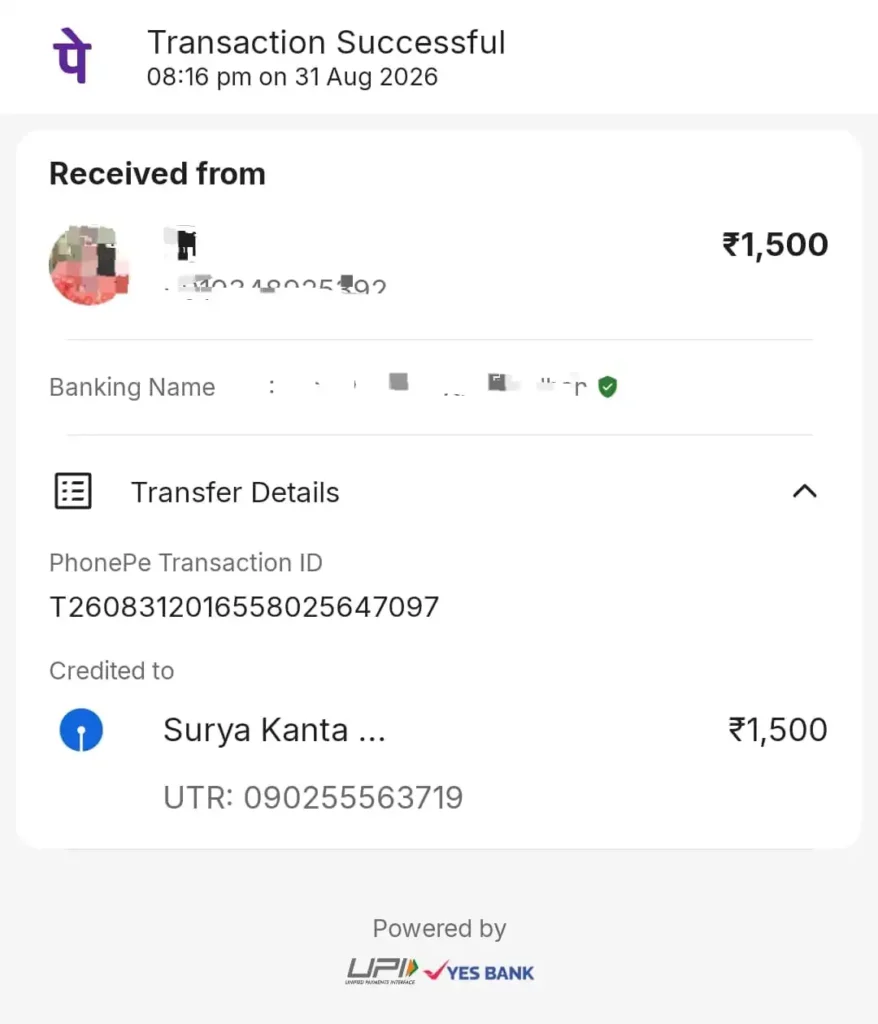
Find your UTR (transaction reference number)
Every UPI transaction has a 12-digit UTR (Unique Transaction Reference), sometimes labeled RRN. This is what your bank, the merchant, and any dispute portal will ask for not the app’s internal order ID. You’ll find it inside the transaction’s detail screen in your UPI app (Google Pay, PhonePe, Paytm, or BHIM), usually by tapping directly on the pending transaction in your history. App menus change periodically, so if the exact wording differs from what you’d expect, look for terms like “Transaction ID,” “UTR,” or “Reference number” on the payment receipt screen.
Bank statement vs. app status
Your UPI app’s status screen reflects what the app has last been told by the network it can lag behind reality. Your bank statement or passbook entry is the more reliable source of whether money has actually left or returned to your account, since it comes directly from your bank’s core system rather than through the app layer. If you’re the receiver, checking your own bank statement (not just waiting for a push notification) is the fastest way to confirm whether a payment has actually landed.
Step-by-Step: What to Do If the Money Isn’t Back
Work through these in order. Don’t skip to the RBI Ombudsman on day one the process is designed to resolve most cases at the first or second step.
Step 1: Raise an in-app dispute (0–48 hours)
Most UPI apps route disputes through NPCI’s UDIR (Unified Dispute and Issue Resolution) system an automated channel that lets your app query the receiving bank’s server directly instead of you having to call anyone. Look for a “Report an issue,” “Help,” or “Raise a dispute” option on the specific transaction. Some apps (Google Pay has documented this) may not let you manually raise a dispute in the first 48 hours, since the system expects automated clearing to resolve it within that window first.
Step 2: Contact your bank’s grievance desk (after 48 hours)
If the transaction is still unresolved past 48 hours, contact your bank directly through its app, official helpline, or branch and ask for a UPI transaction dispute / chargeback to be logged, quoting your UTR and the exact date and amount. Ask for a complaint reference number; you’ll need it if you escalate further.
Step 3: NPCI Dispute Redressal Portal (if the bank doesn’t resolve it)
If your bank fails to resolve the issue within the regulatory T+1 or T+5 window, you can escalate directly to NPCI, the organization that operates the UPI network, through its dispute redressal page. You’ll need your UTR, bank details, and transaction amount. Form fields on this portal are updated periodically, so check the current requirements on NPCI’s site when you file.
Step 4: RBI Integrated Ombudsman Scheme (after 30 days)
If your bank hasn’t resolved your complaint or rejects it without a satisfactory explanation within 30 days, you can escalate free of cost to the RBI Ombudsman at cms.rbi.org.in. As of July 1, 2026, this falls under the RBI Integrated Ombudsman Scheme, 2026, which replaced the 2021 version. Under the current scheme, the Ombudsman can award compensation of up to ₹30 lakh for direct financial loss and up to ₹3 lakh for harassment, mental anguish, or loss of time figures that were lower (₹20 lakh / ₹1 lakh) under the superseded 2021 scheme. Cite RBI Circular RBI/2019-20/67 directly in your complaint when the issue is a delayed technical reversal.
The ₹100/Day Delay Penalty And How to Actually Get It
RBI’s rule states this compensation must be credited suo moto automatically, without you having to ask. In practice, many banks only process the principal reversal automatically and don’t proactively add the daily penalty unless prompted. If your reversal was delayed beyond T+1 or T+5, it’s worth explicitly requesting the compensation in writing when you contact your bank’s grievance desk, citing RBI Circular RBI/2019-20/67 by name and date range of the delay. If the bank still doesn’t credit it, this is a valid, specific point to raise with the RBI Ombudsman.
Watch Out: Fake Customer Care and Refund Scams
Searches for “UPI pending payment help” are a known target for scammers, so a few rules are worth keeping in mind regardless of how urgent your situation feels.
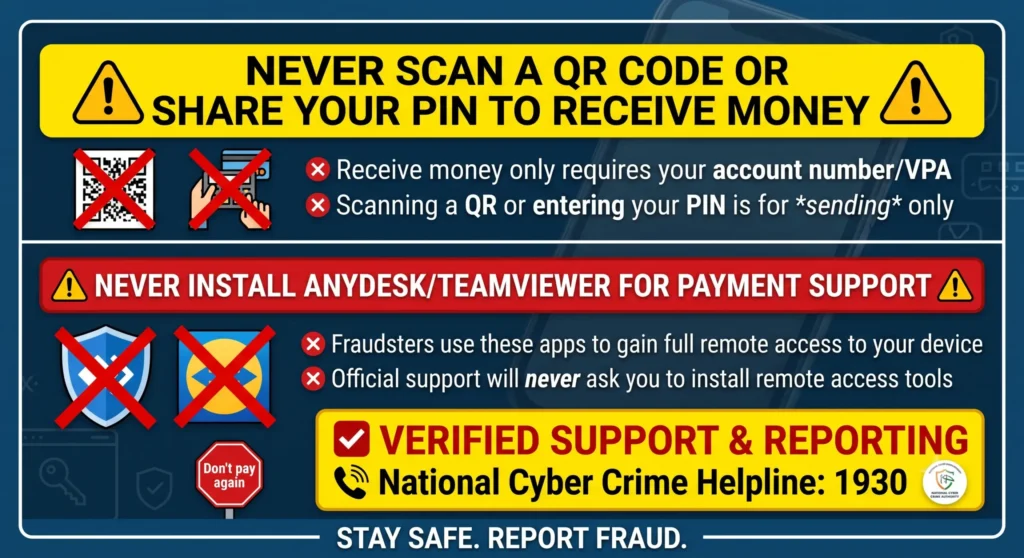
- Never install remote-access apps (AnyDesk, TeamViewer, QuickSupport, or similar) because someone on a phone call asked you to, even if they claim to be from your bank, NPCI, or your UPI app’s support team. Genuine banks and payment apps do not need remote access to your device to “release” a pending payment.
- Receiving money or a refund never requires scanning a QR code or entering your UPI PIN. If anyone asks you to do either to “receive” funds, it’s a scam a PIN and QR code are only ever used to send money.
- Don’t trust customer-care numbers found through a general web search or social media post. Use the number listed inside your actual banking app, or your bank’s official website.
- If you’ve already shared an OTP, PIN, or given remote access, or you suspect a fraudulent transaction rather than a genuine pending payment, report it immediately to the National Cyber Crime Helpline: 1930, or file a report at cybercrime.gov.in. This is separate from the technical dispute process above and is specifically for suspected fraud.
Frequently Asked Questions
Is my money definitely safe if UPI shows “Pending”?
In the large majority of cases, yes: it’s held within the banking clearing chain and either credits the receiver or auto-reverses to you within the RBI’s mandated windows. This is different from a scenario where you were tricked into authorizing a payment yourself; that’s fraud, not a pending transaction, and needs to be reported separately.
The receiver says they haven’t gotten it, but my app shows “Success.” What now?
Ask the receiver to check their bank statement directly rather than relying on app notifications. Funds occasionally land in a different linked account than the one they’re actively checking. If their statement genuinely shows no credit after your app confirms a debit, that’s the trigger to raise a dispute using your UTR.
Do weekends and holidays pause the reversal countdown?
No. RBI’s rule defines “T” as the calendar date of the transaction, and this includes Sundays and public holidays. The auto-reversal clock doesn’t pause for non-banking days.
What if it’s a stuck UPI Autopay mandate, not a one-time payment?
Recurring mandate payments (subscriptions, SIPs, EMIs) follow slightly different retry logic than one-time transfers. If a mandate debit is stuck pending, check your bank statement first; if funds were debited without the payee receiving them, the same T+1/T+5 dispute process generally applies since it’s still governed by the same RBI framework.
What’s the difference between “Pending” and “Failed”?
“Failed” means the transaction didn’t go through and, in almost all cases, your account was never actually debited (or the debit is reversed near-instantly). “Pending” specifically means a debit did occur but final confirmation from the other end is still outstanding.